
What is a DNS zone?
The most well-known zones are the DNS root zone, where the DNS begins, and the Top Level Domains (TLDs) such as .com, .net, .org, etc. Below the TLDs, virtually every recognizable brand with a presence on the Internet has its very own DNS zone. So, for example, individual DNS zones exist for google.com, wikipedia.org, bit.ly, and millions upon millions of other domains.

Where does a zone begin?
Every DNS zone begins at a specific name in the DNS. The DNS zone owns that name and all of the children of that name. For example, the .com TLD is a zone that begins at the name "com" and extends downwards to encompass all of the DNS names that end with ".com".
The DNS contains a special record at the start of each zone: the Start of Authority (SOA) record. This record signifies the beginning of a zone and contains some important metadata about the zone. All zones start with an SOA record.
And where does a zone end?
Each zone owns the name where the zone starts and of that name's children. But each zone's administrator can insert delegations to transfer, or "delegate", ownership to other zones.
A delegation serves two important purposes. First, a delegation marks the end of the zone's authority. The delegated name and all of its children are not part of the zone: they are instead part of the child zone. Second, the delegation publishes, to the entire Internet, the set of DNS servers that can resolve names in the child zone.
In this way, the global DNS begins at the root zone and flows downwards to different zones through delegations.
An example zone
Let's consider a simple example zone file. The zone starts with an SOA record. There must also be two or more NS records at the root of the zone. And often MX records for mail delivery, and other records as well.
example.org. 3600 SOA ns1.example.org. admin.example.org. 100 7200 3600 86400 300
example.org. 3600 NS ns1.example.org.
example.org. 3600 NS ns2.example.org.

database.example.org. 3600 A 10.0.0.3
database.example.org. 3600 A 10.0.0.4

mail.example.org. 3600 A 10.0.0.1
mail.example.org. 3600 A 10.0.0.2

; The 'support' subdomain is delegated to DNS servers of a third party
support.example.org. 3600 NS ns1.support-software.org.
support.example.org. 3600 NS ns2.support-software.org.
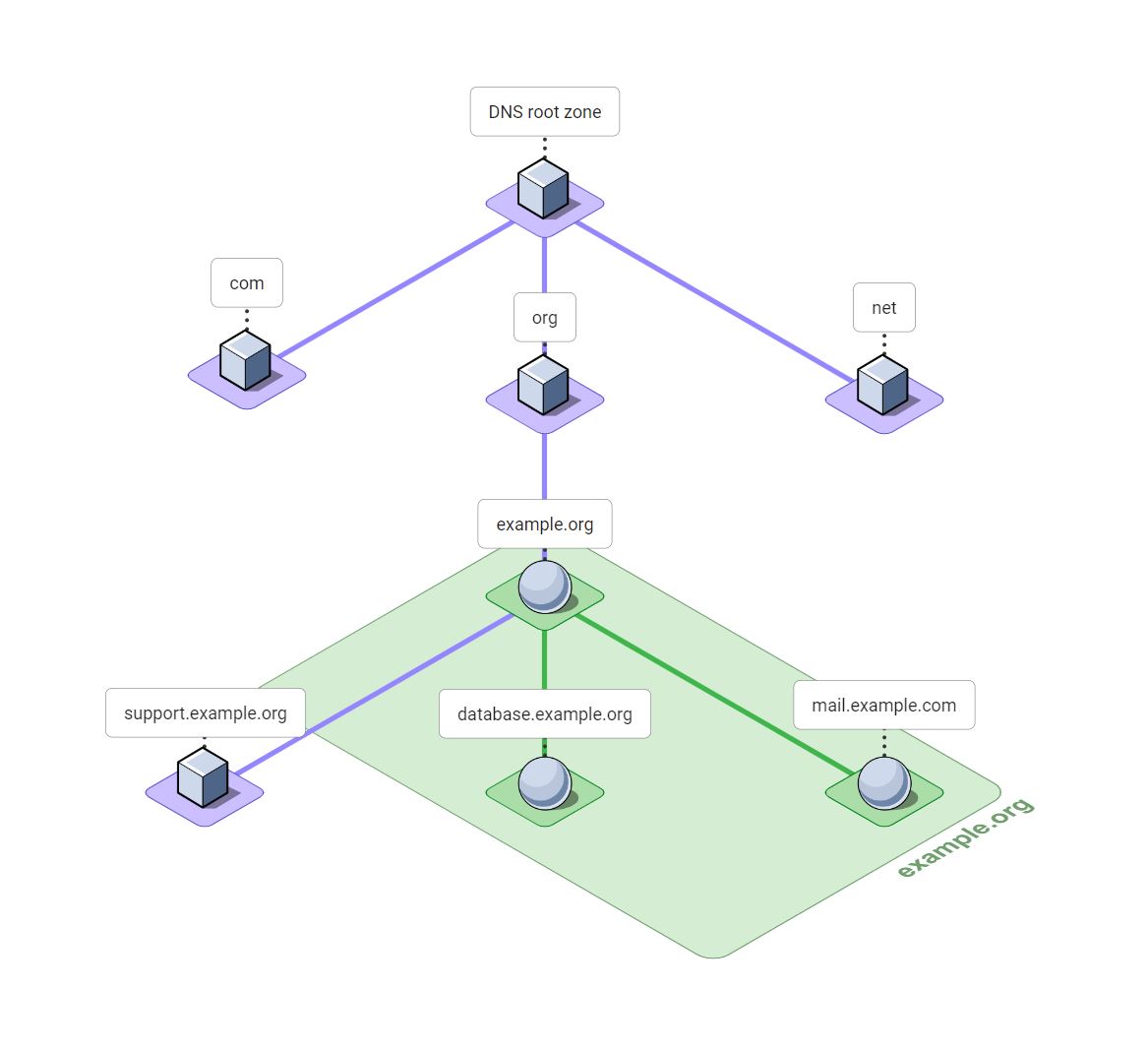
The example.org zone owns, or is authoritative for, the DNS nameexample.org. It also owns all of the DNS names that are children of example.org, with the exception of support.example.org. The delegation at support.example.org means that authority at that point in the DNS tree is delegated to other DNS servers.
What names in the DNS belong to the example.org zone?
It's helpful to consider the DNS as a tree of names starting with the DNS root at the top and flowing downward. Each node in this tree represents one label of a DNS name.
As we discussed, the example.org zone begins at example.org and flows downwards to all child names, stopping at delegations. So names shown as spheres on green in the diagram below are part of the example.org. Names shown as cubes on purple belong a different zone in the DNS.
How do DNS lookups use DNS zones?
A DNS lookup occurs when a piece of software, such as a web browser, needs to map a DNS name to an IP address or another piece of DNS data. The result of a DNS lookup is often an IP address, but it may be something else. For example, a DNS MX record lookup is used to retrieve the mail servers for a domain.
DNS lookups are performed by a software component called a DNS resolver. The DNS resolver begins each query at the DNS root domain by sending a DNS query to one of the DNS root servers. The root server will usually respond with a delegation. The resolver then sends the same query to one of the DNS servers listed in the delegation. These servers might respond with another delegation. This process continues until the DNS resolver gets an answer from one of the DNS servers authoritative for the zone.
A DNS resolver performing a DNS lookup for a typical name such as www.example.org will move through three DNS zones:
- The root: Authority begins with the DNS root zone. The root zone contains a delegation to the
orgzone. - org: The
orgzone contains a delegation to theexample.orgzone. - example.org: The
example.orgzone would typically contain A or AAAA records forwww.example.org.
Related questions
What is a DNS zone file?
The zone file is a standardized text file format for the DNS. DNS server software such as BIND, Unbound, Knot, and many others read the DNS records for each DNS zone that they host from a DNS zone file.
Each DNS record in a zone is represented by one line in the zone file. Each line includes the owner name of the DNS record, the Time-To-Live (TTL) of the record in seconds, the record type, and the record data. Each DNS zone file contains all of the records for a single DNS zone.
Today, many DNS providers have a web-based or scriptable portal that can be used instead of DNS zone files. But these providers usually offer a way to import a DNS zone file. The DNS zone file format is also convenient for examples in articles on the DNS!
What is DNS zone transfer?
Zone transfer is used to copy or "transfer" the contents of a DNS zone from one DNS server to another over the Internet using the DNS protocol.
DNS zone transfer was introduced in RFC 1034 and RFC 1035 and later updated by RFC 5936. Each zone transfer includes every record in a DNS zone. Incremental zone transfer was added in RFC 1995 to improve efficiency.
Zone transfer allows a DNS administrator to host a zone on multiple DNS servers for redundancy without having to manually copy the zone to each DNS server whenever a change is made. The administrator makes changes on one DNS server, called the primary server, and zone transfer automatically updates all of the other DNS servers for the zone, called the secondary servers.
How many zones can be involved in a single DNS lookup?
Up to 63! But usually three to five.
In our example lookup for www.example.org there were three zones but the lookup path from the root can flow through more than three zones. In theory there can be up to 63 labels in a DNS name which could mean up to 63 distinct zones! But between three and five labels, and roughly that number of zones, is typical.
Each label in a DNS name may lie in a different DNS zone, or a single zone may encompass multiple labels.